Sunday, August 25, 2013

Safely Show You Tube Videos in Your Classroom


Do you find great online videos or ebooks for your lessons only to get discouraged by all of the ads, etc. that come with it?  Well, I just learned of an easy fix for that problem!  The video above shows how easy it is to convert a YouTube video to a Safeshare.tv video.  SaveShare is a website that takes YouTube videos and gets rid of almost ALL of the advertisements and extra stuff around the main video.  Safeshare even removes the ads that are often shown before popular videos.  Using it is VERY simple.  All you do is copy the YouTube link and past it into Safeshare.tv (see image below).  Then, you are given a new link to use instead of the YouTube link.  Save that to your favorites and you are all set!  Sometimes its just these little things that make our job as teachers so much easier and less stressful.  Happy viewing and have a great school year!


http://safeshare.tv/

Flower Clip Art


Sunday, July 28, 2013

Free webinars, resources, and collaboration!


I am so excited that I am now an official "Ambassador" for Simple K12!  

Ambassador blog badge
Hi friends,

I wanted to tell you about SimpleK12's Teacher Learning Community.  I'm a Member and love all of their resources for educators. You should join!


There is a free basic membership that allows you to:
  • Learn from subject matter experts in live webinars
  • Join in ongoing discussions on the hottest education topics
  • View and share the most popular teacher resources
  • Connect with educators from around the world
  • and more!


I've learned so much and would love to connect with you inside of the Teacher Learning Community.  See you inside!


P.S.  There are many more webinars coming up in August with topics to help you get ready for those first days of school.  


Flower Clip Art

Wednesday, June 26, 2013

Do You Know About Google Alerts?

Do you have a special interest that you would like to follow but just can't always find the time to search for the latest information? Google Alerts can help. 

Google Alerts are e-mails that are automatically sent to your inbox whenever new information becomes available on your search terms. Depending on your search preferences, Google will monitor News, Web, Blogs, Video and Groups (or all of them) for new information, and send it to you on the schedule you've set up.

For example, suppose you are interested in following the latest posts on CCSS elementary math, or CCSS early language, or have a particular professional interest, if so, then, set up a Google Alert. When new information is available, an e-mail and snippet will be sent to your inbox.


The image below outlines how to set up Google Alerts:

Applications for Education
Google Alerts can be a great way to find resources you can use in your classroom.  For example, if you're a mathematics teacher, set up an alert for "mathematics lessons" or mathematics games" and new content will be delivered to you.  In a course that requires students to share current events stories, Google Alerts could be useful for students to track stories on a particular news topic.

This is an especially great tool for us busy teachers!  Check it out soon, if you haven't already!


Flower Clip Art

Thursday, June 20, 2013

iPad Tips and Resources


I am fortunate to have an iPad in my classroom and would like to pass along some helpful suggestions to you other lucky iPad users. Thanks to some great Simple K12 webinars this summer I am learning all kinds of new stuff and have gathered up some great resources, too!

Here is a link to a cute "Rules for the iPad" poster.  It comes in a single sheet size or a large poster size:
                                   Heidi Songs Logo 
                                            
           http://www.heidisongs.com/Free_Downloads/assets/Classroom_iPad_Rules.pdf

Here is a link to a poster for the older kiddos:


Here is something else I was so excited to learn about - controlling the app students are to use.  I have soooooo many apps in folders on my classroom iPad that it could be very confusing for students, but did you know that you can limit your students to one app, and prevent them from tapping certain areas of the screen?
In settings, go to General (on the left) and scroll down to Accessibility on the right. Turn Guided Access on. Set a passcode.  Once you have Guided Access enabled, go to the app you want your students to use and get on the screen they will be using. Triple-click the home button to activate guided access and lay rectangles over the areas you want to deactivate. For example, you could deactivate the ads at the bottom of an app so the student can’t click them, or the settings button, or prevent the students from viewing any YouTube videos other than the one they are supposed to be viewing. The student won’t be able to do anything on the iPad except that app. Even if they know about triple-clicking the home button to turn Guided Access off, they’ll still need the passcode.

Below are some links for more information on apps, lesson ideas, and other resources:


1. iClassroom- Livebinder by Jen Goldberg:  http://www.livebinders.com/play/play?id=759512

2.  j2Training Livebinders on digital topics -
 http://www.livebinders.com/shelf/search?search=&terms=j2training&type=1

3.  iPad World -Livebinder by J. Corder and J Gore:
  http://www.livebinders.com/play/play?id=207117

                                  
The following is a great ebook containing iPad educational apps:
http://naomiharm.org/Master%20iPad%20List%20Winter%202012%20Naomi%20Harm.pdf


Here are some Pinterest pages:

1.  Pinterest page by Lennette Holden: http://pinterest.com/lennette1963/ipad-in-the-classroom/
 
2.  Shelly Terrell on Pinterest: http://pinterest.com/shellyterrell/

3.  Melissa Mann on Pinterest:  http://pinterest.com/mnmann/


I hope that you are able to take some time and check out these wonderful resources!  Enjoy your summer!


Flower Clip Art

Sunday, March 17, 2013

Spring is Coming!

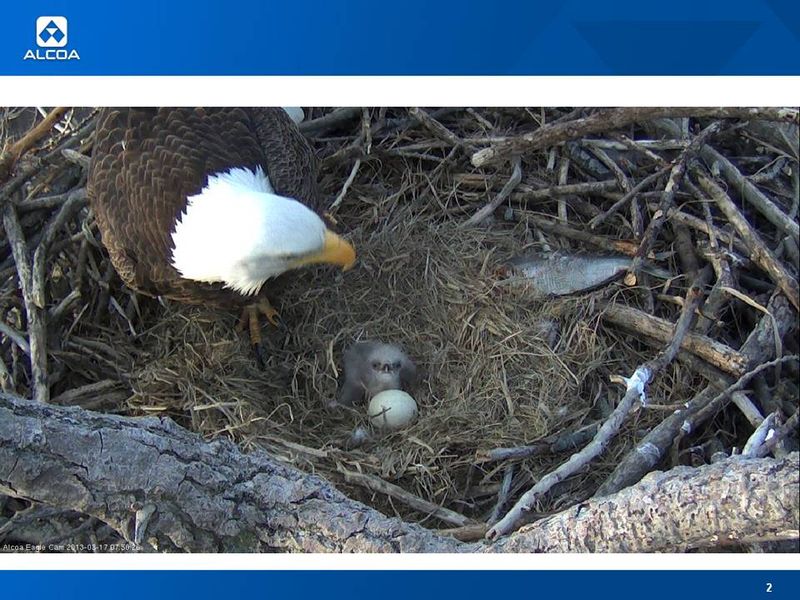
With spring comes new life, and a wonderful way to view this is on Alcoa's eagle web cam located on the Mississippi River near Davenport, Iowa.

An eaglet just hatched yesterday in the seven-foot nest belonging to a pair of eagles residing here since 2009. My first graders are always very excited to check in on the latest happenings each day. It's so much fun to watch the babies grow, to watch the parents bring food to the nest, and to learn about these amazing creatures, our national birds!


 The site also has other educational resources available for teachers and parents. Everyone should take some time to sit back and just enjoy the incredible sites and sounds of nature at its best! Happy spring!


Flower Clip Art

Saturday, January 5, 2013

Snow Fun Resource


Hi everyone!  I just wanted to pass along this great collection of snow related activities, games, and information from Shannon at Technology Rocks Seriously.  Thanks Shannon!


click here 


Flower Clip Art

Monday, December 31, 2012

Happy New Year!


Free Blinkies

Wishing everyone a happy, healthy, and wonderful new year!


Blinkie courtesy of Barb over on Ruby Slippers Blog Designs!


Flower Clip Art

Friday, December 28, 2012

Thinking of Sandy Hook

It's hard to believe that is has been two weeks since the horrific tragedy at the Sandy Hook Elementary School.  I wanted to share this photo of the staff at my school as we gathered for a moment of silence, shared our thoughts with each other, and sent thoughts to those families in Connecticut.  We will never forget you!


Flower Clip Art

Saturday, December 22, 2012

CCSS Resources

Like all of my fellow teachers, I am always on the lookout for new CCSS resources.  I would like to thank Jeannette Stein for sharing the following CCSS related websites via SimpleK12!


  Teaching the Core is an amazing site! Not only ELA teachers, but history, science, and math teachers will also find this helpful as we integrate the literacy standards into our schools. It gives understanding and real meaning to the Common Core Standards for reading and writing.

     CCSS Math  This site is a collection of math resources from across the internet. It includes videos, lessons, interactive practice and other resources all sorted by standard.

 Achieve the Core is a great tool to help teachers understand the Common Core. 

Flower Clip Art

Sunday, December 16, 2012

Whose Child is This?


I want to join with all of my fellow bloggers in this day of silence to honor those families in Newtown, Connecticut.  The following poem as posted by Erica Bohrer does a wonderful job of summing up our sentiments.


Let's keep these dear folks in our thoughts and prayers.

Flower Clip Art

Wednesday, December 12, 2012

My Classroom Blog

Hi everyone!  I just migrated my class blog to Blogger.  You are invited to hop over and check out what we have been up to in my classroom!  The link is below:

J Nelson's First Grade Blog


Flower Clip Art

Monday, December 10, 2012

Vocabulary and "WordSift"


Recently, I attended an RTI workshop emphasizing the importance of vocabulary instruction in the new Common Core State Standards.  It just so happened that I also watched a webinar sponsored by Scholastic and USC Rossier School of Education on adapting to the CCSS which, coincidentally, also included the topic of language and vocabulary.  Then, while searching out some new apps for iPad, I discovered this amazing website that is a perfect tool for enhancing lessons involving complex vocabulary and thought I would share it with you:
WordsiftlogoWordSift.com 


This website has numerous features enabling a teacher or student to focus on the words that are essential to the understanding of a piece of text.  WordSift is easy to use.  The first step is to cut and paste any text into the text box.  The program quickly identifies important words that appear in the text.  Unlike other word cloud type programs, this program has some features that are important to teachers such as the ability to mark and sort different lists of words.  For example, words can be sorted by domain and appear in color if they relate to that particular domain.  Other functions include visualization of word thesaurus relationships, and Google® searches of images and videos.  In addition, when clicking on any word in the Tag Cloud, the program displays instances of sentences in which that word is used in the text.

Uses for teachers could include, but are not limited to: preparing lessons, previewing text with students, small group activities, supporting literacy, and assessment.

I can't wait to try this in my classroom!  I hope you find it useful!


Flower Clip Art

Saturday, December 8, 2012

Common Core Resources for Teachers and Parents

I wanted to share some resources I recently ran across to aid in the implementation of the CCSS.

This five minute video provides insight as to why children need clearer and higher standards.


Here are some links to Common Core Resources:

http://www.gwd50.org/cms/lib01/SC01000859/Centricity/Domain/41/Common_Core_State_Standards_gif.png

South Carolina Department of Education
Additional link:   http://scde.mrooms.org/index.php?page=27565

NYC

Engage NY

Georgia DOE


http://www.smarterbalanced.org

http://insidemathematics.org/

http://illustrativemathematics.org/

https://www.teachingchannel.org/


I hope you find these helpful!


Flower Clip Art